![dooap-logo-black-1.jpg]](https://help.dooap.com/hs-fs/hubfs/dooap-logo-black-1.jpg?height=40&name=dooap-logo-black-1.jpg)
This article provides guidance on how to export different types of invoice-related data.
Basic information related to the Search view can be found here: Search Function.
- Search for the invoices you want to export.
- Select the invoices you want to export.
- Select Export search results.

- Choose which data types to export and click Start export.
You can choose multiple options at once.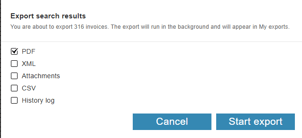
- While the export is in progress, you can continue with other tasks.
- When the export is finished, a message will be displayed at the bottom of the page.

- In the Search view, click My exports.

- Select Download to save the data.