![dooap-logo-black-1.jpg]](https://help.dooap.com/hs-fs/hubfs/dooap-logo-black-1.jpg?height=40&name=dooap-logo-black-1.jpg)
Functionality
To add coding directly from imported invoice's XML data, Dooap will check the applicable invoices for following segments:
-
ROW/DEFAULT_ROW_POSTING/ACCOUNT_REFERENCE
Populates line coding for each row. The coding pattern should be presented as a string, separated by a semicolon (;)<ACCOUNT_REFERENCE> 600170;;025;011;AudioRM </ACCOUNT_REFERENCE> -
ROW/FREE_TEXT
This element will be populated to the coding row’s field "Transaction text" -
ROW/ROW_TOTAL
This amount will be populated to the coding line’s amount field. - INVOICE_CENTER / CONTENT_FRAME / INVOICES/ INVOICE/ ROWS / ROW / DEFAULT_ROW_POSTING / REPORTING_CODE
Support for destination company in coding.
Notes
- Automatically created lines can be edited by user.
- If segments of coding are left blank, Dooap will automatically fill those in with vendor default dimensions.
- If coding includes incorrect values, these will be populated to the UI and validated against the company's account structure .
Administration
To activate the feature, please contact Dooap support support@dooap.com.
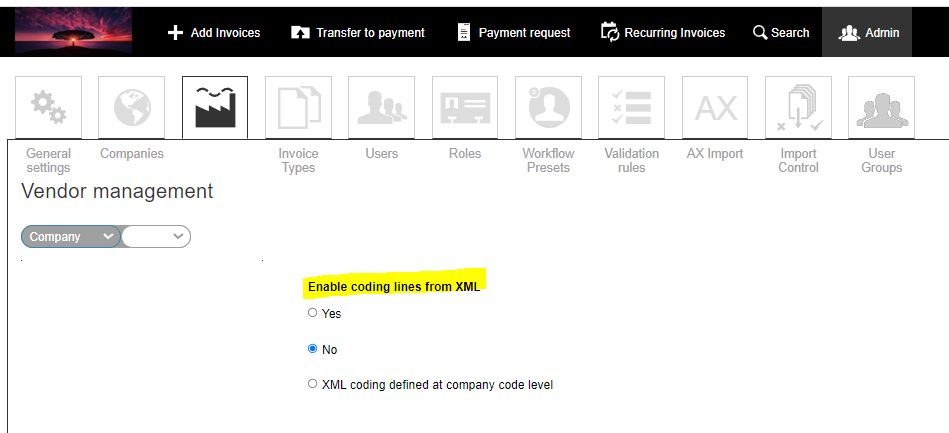
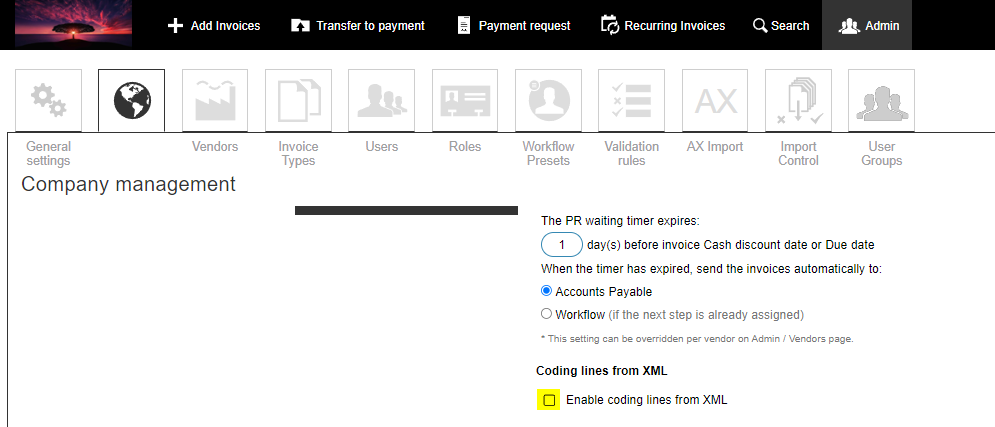
Once activated, the feature can be enabled in Dooap Admin section on two levels:
- For a single vendor.
- For the entire company.
Roadmap
Improvements to the feature will be added in coming releases, including:
- ML support
- Manually fetch coding lines
- Configurable vendor default dimensions to missing segments
- Project coding.